Recording more footage is easier than organizing it. A single project can quickly produce hundreds of generically named clips that are difficult to identify later. Once those files accumulate, finding a useful shot often means reopening and reviewing footage that nobody had time to describe properly.
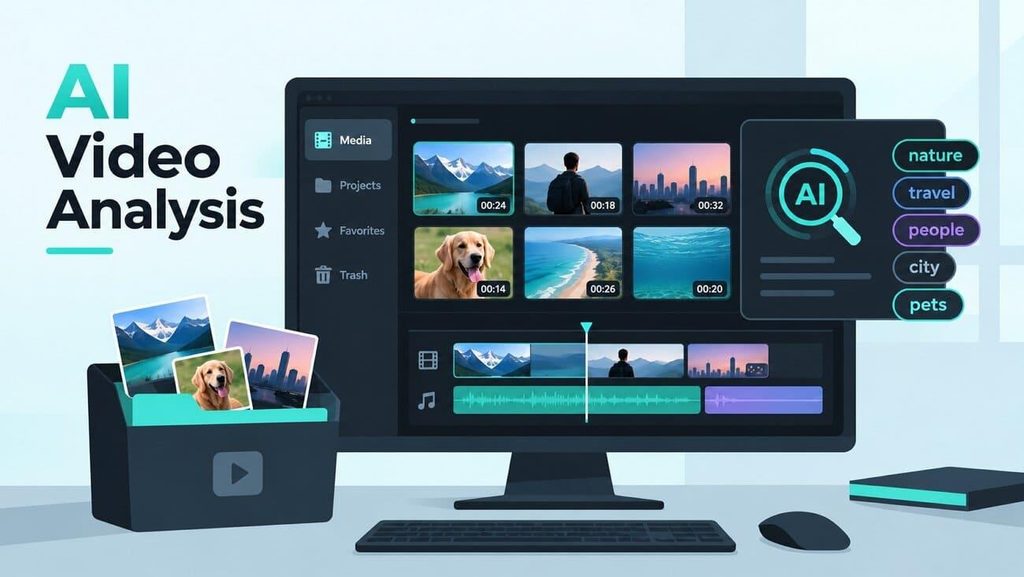
AI video analysis approaches the problem by examining footage and producing descriptive information about its contents. Instead of opening every clip first, video editors can use those results to identify potentially relevant footage and decide what deserves closer review.
Part 1. Why Managing Large Amounts of Video Footage Can Be Difficult
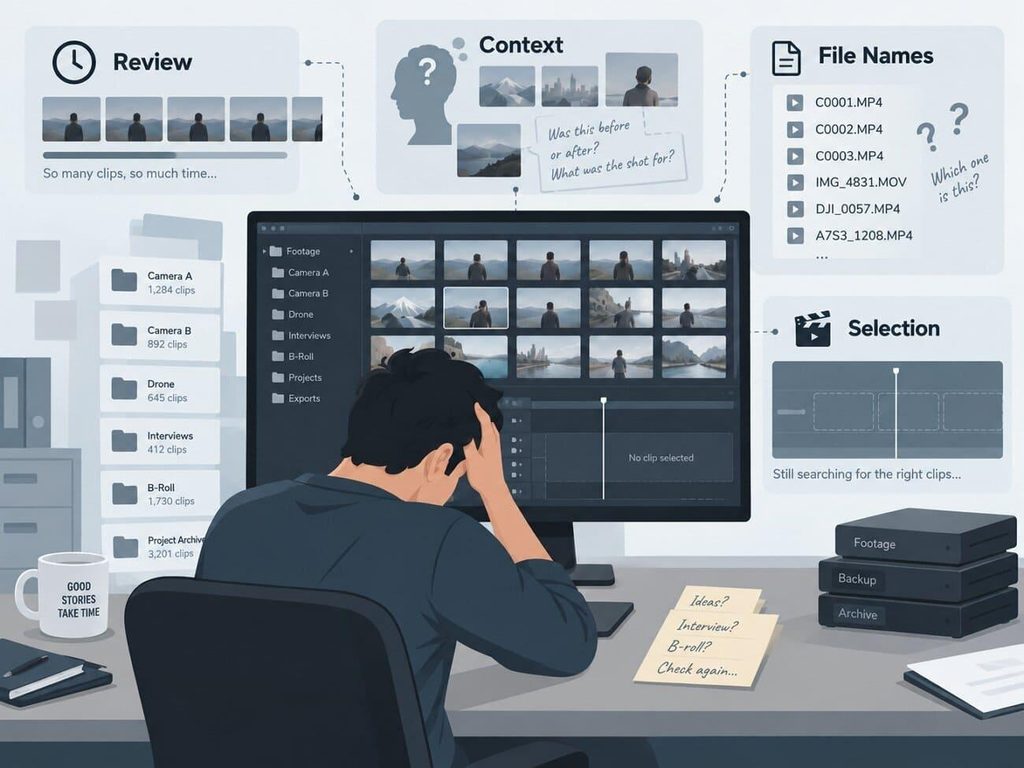
Reviewing footage produces something valuable and then throws most of it away. An editor who watches 40 clips ends the session knowing what each one holds, yet almost none of that knowledge reaches the files themselves.
Anyone returning a month later, including the same editor, starts the viewing again from the beginning. 4 separate costs sit inside that pattern, and every one of them grows with the size of the library.
- Review Takes Time: Editors still need to inspect footage before deciding what is useful. Large volumes of media can make this early review stage slow and repetitive.
- Useful Context is Easy to Lose: Editors may remember what a clip contains after watching it, but that knowledge is not always recorded for later use.
- File Names Reveal Little: Camera-generated names and date-based folders usually identify files by sequence or capture time, not by the content shown inside them.
- Selection Can Be Delayed: Editors often spend the beginning of a project identifying available footage before they can confidently choose clips and start building the edit.
None of the 4 is solved by more storage or by stricter file naming. Running AI video analysis can move part of the initial footage-review work onto software. Instead of opening every clip immediately, editors can review detected descriptions and use them to narrow down the media worth checking more closely.
Part 2. 10 Ways AI Video Analysis Can Help With Video Management
A stored description proves useful in specific situations rather than as a general improvement. Video content analysis matters most wherever an editor spends time that leaves no trace in the finished cut. Those moments cluster into three stages, starting with the search for a usable shot.
Finding the Right Clip Faster
Selection is where the loss shows most clearly, because the editor already knows what is needed and only has to locate it.
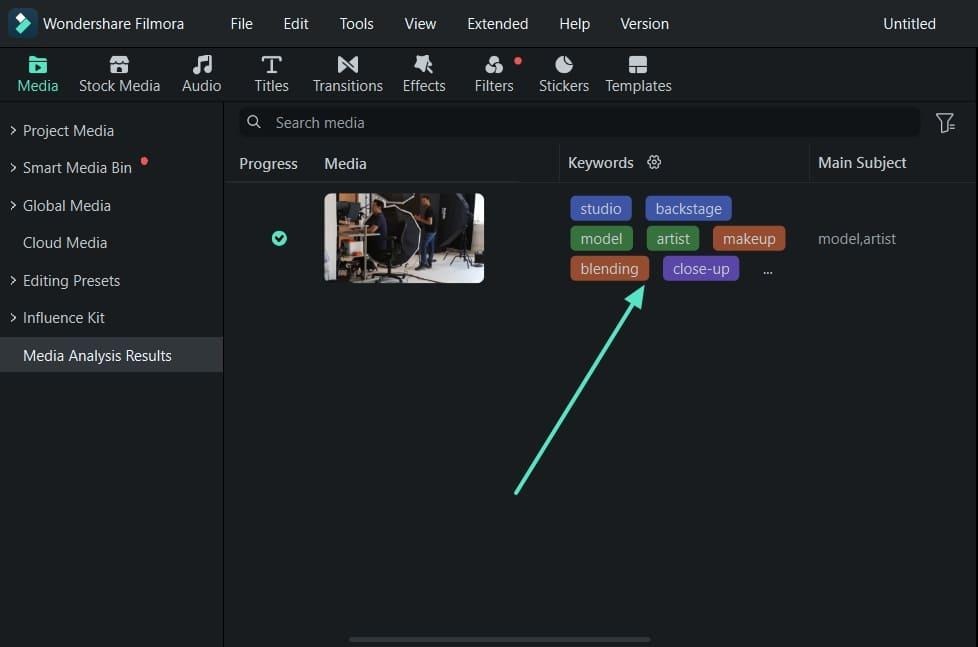
Use Case 1. Identify Relevant Footage More Quickly: AI analysis can provide descriptive keywords for analyzed clips, helping editors recognize potentially useful footage before reviewing every file in detail.
Use Case 2. Compare Clips With Similar Content: Keyword results can help editors notice which analyzed clips appear to contain related subjects or scenes, making it easier to decide which files deserve closer comparison.
Use Case 3. Understand Unfamiliar Clips Faster: AI-generated keywords can provide a quick indication of what analyzed footage contains, which can help editors approach unfamiliar media without opening every clip first.
Keeping a Growing Library Searchable
Those gains repeat on every project, but a different problem takes over once footage outlives the job it was shot for.
Use Case 4. Analyze Selected Media Before Editing: After importing footage, editors can choose which clips to analyze. The resulting keywords can provide additional context before detailed editing begins.
Use Case 5. Make Generic File Names Easier to Understand: Camera-generated names may reveal little about a clip’s contents. AI-generated keywords can provide additional descriptive context that helps editors distinguish analyzed media more quickly.
Use Case 6. Review Project Media With More Context: Detected keywords provide another layer of information besides the imported clip, helping editors understand analyzed footage while working through project media.
Use Case 7. Help Editors Understand Unfamiliar Footage: When another editor works with project media, descriptive analysis results can offer a quick overview of analyzed footage before they begin reviewing individual clips.
Getting More Out of Footage You Already Have
A searchable library also changes what counts as available material. Tools that analyze videos once make every past project part of the pool a new one can draw from.
Use Case 8. Narrow Down Previously Imported Media: When a project contains footage from different stages of production, analysis results can help editors identify which analyzed clips may be worth revisiting.
Use Case 9. Reduce Unnecessary Clip Review: Descriptive keywords can help editors narrow the media that appears relevant, allowing them to spend detailed review time on a smaller group of clips.
Use Case 10. Move From Footage Review Into Editing Faster: Using analysis results to understand selected media can reduce the time spent identifying footage before editors begin making creative decisions on the timeline.
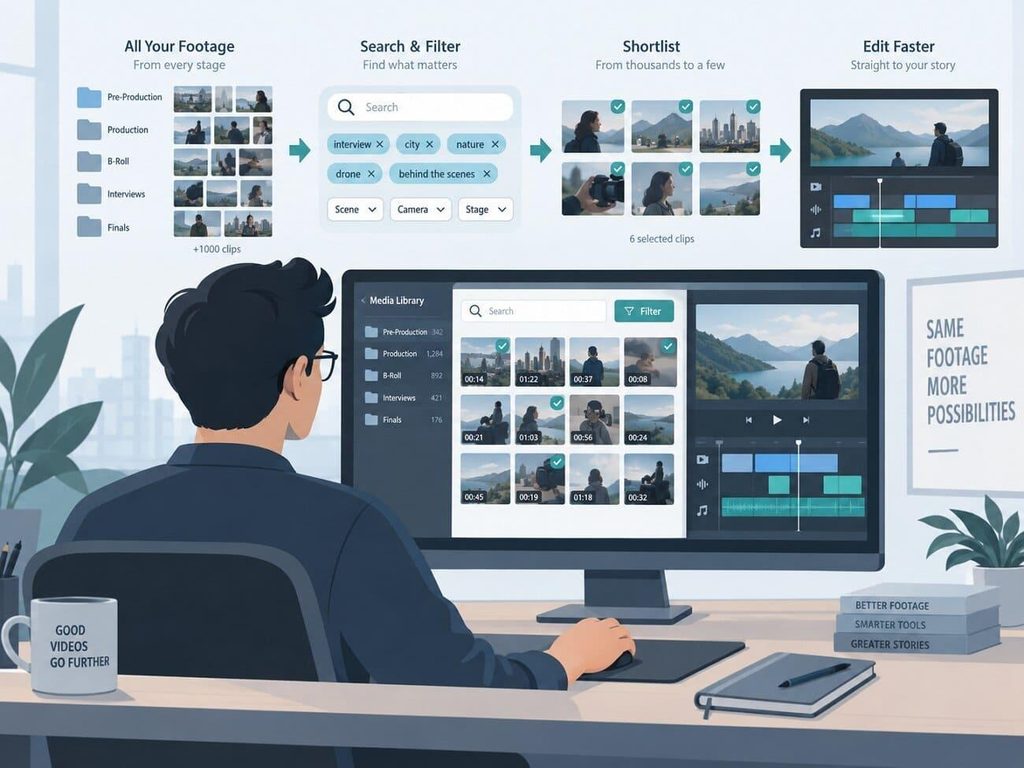
Part 3. AI Video Tagging and AI Video Recognition
Those use cases share a common foundation because AI systems first identify information within video and turn it into descriptive data that can support organization and review.
AI video tagging refers to assigning labels, keywords, categories, or other metadata to video content based on what a system identifies. These tags can help describe clips more consistently and make large media collections easier to understand.
AI video recognition is a broader industry concept that can involve identifying visual, textual, or audio information, depending on the system being used. AI video tagging turns detected information into descriptive labels or metadata. Filmora’s documented AI Media Analysis workflow is more specific: it analyzes selected media and displays detected “Keywords” describing the content.
A single clip can carry several descriptive labels, which gives editors more context than a file name alone. These concepts work together, but they serve different purposes in a video management workflow.
| Capability | What It Produces | How It Supports Video Management |
| AI video recognition | Identifies visual or other detectable information within video, depending on the system. | Helps software understand what kind of content appears in the footage. |
| AI video tagging | Converts detected information into keywords, labels, categories, or other metadata. | Adds descriptive context that can make clips easier to identify and organize. |
| Content-based discovery | Uses descriptive information associated with media to help surface relevant footage. | Can reduce the amount of material editors need to review manually. |
Part 4. How Filmora AI Media Analysis Supports Video Management
Inside an editing suite, the chain gets shorter because the labels land on the same clips the timeline will use. Filmora applies that chain to media already sitting in a project rather than to a catalog kept separately. It documents AI Media Analysis for Mac and Windows as four steps that stay inside the editor.
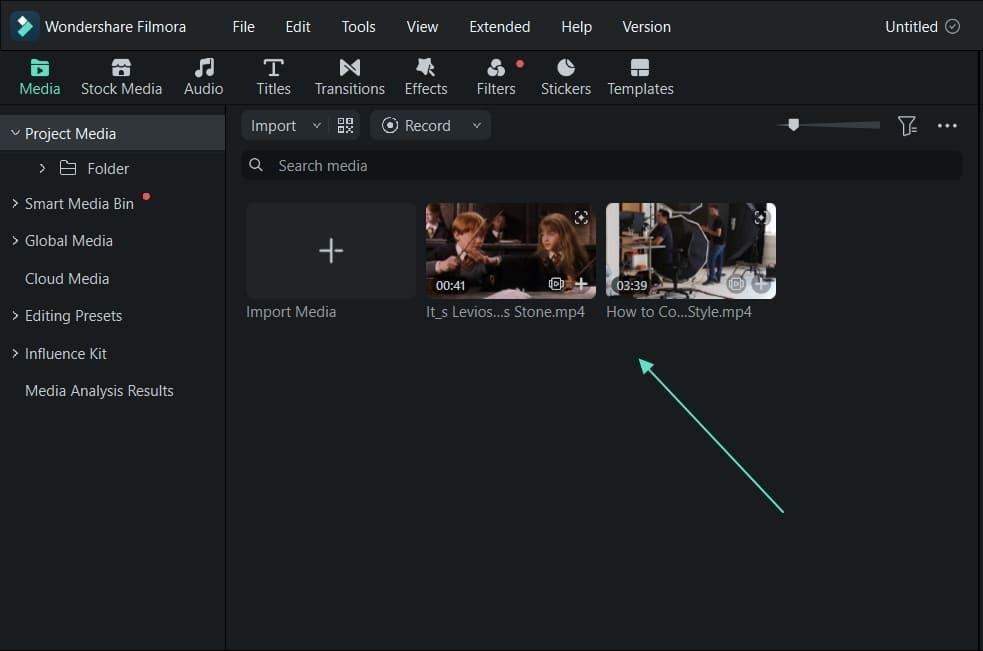
Step 1. Import the Footage
Launch Filmora, start a project, and bring the video in through “Project Media.” Once added, the clip becomes available in the “Media” panel.
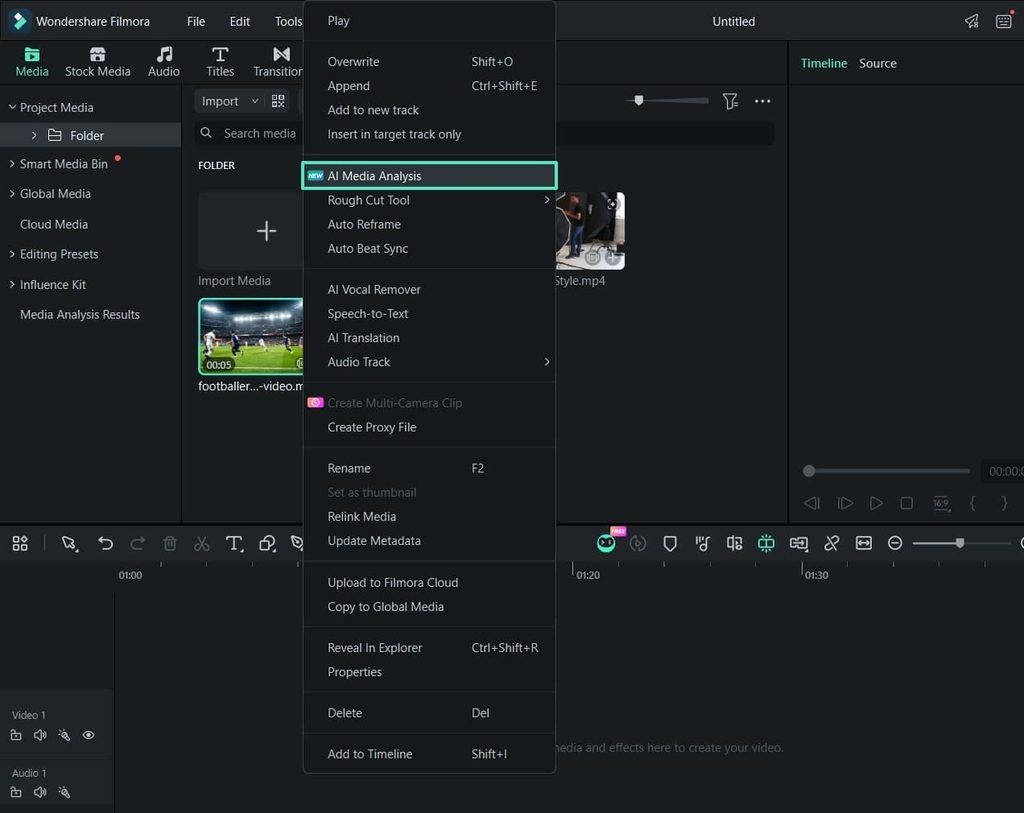
Step 2. Open the Context Menu
Locate the imported clip inside the “Media” panel, then open its context menu. The “AI Media Analysis” command sits among the options listed there.
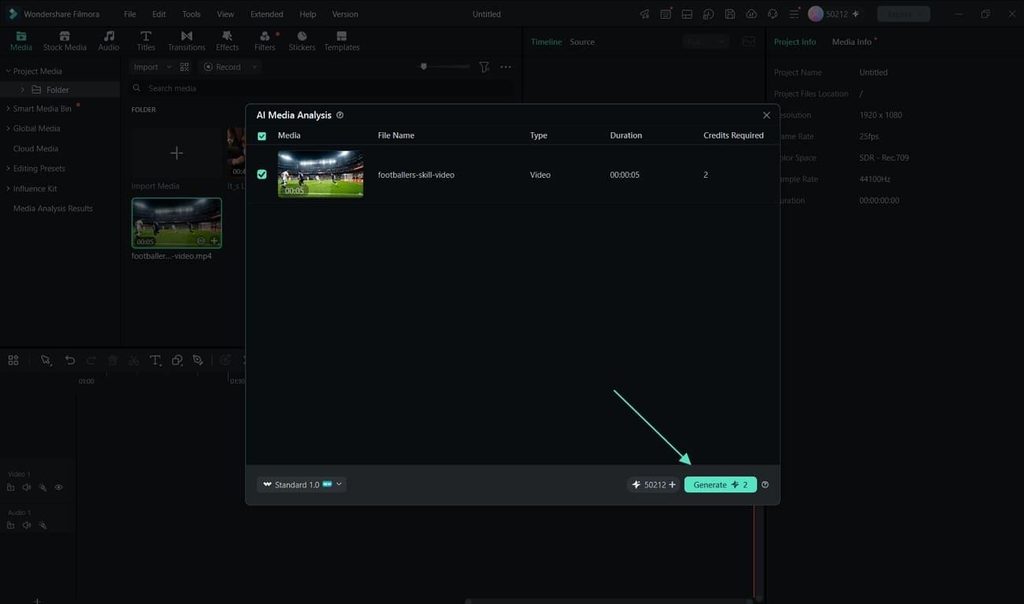
Step 3. Generate the Analysis
The “AI Media Analysis” window shows the selected media alongside the credits the run will use. Confirm that the right clip is selected, and clicking “Generate” starts the processing.
Step 4. Read the Results
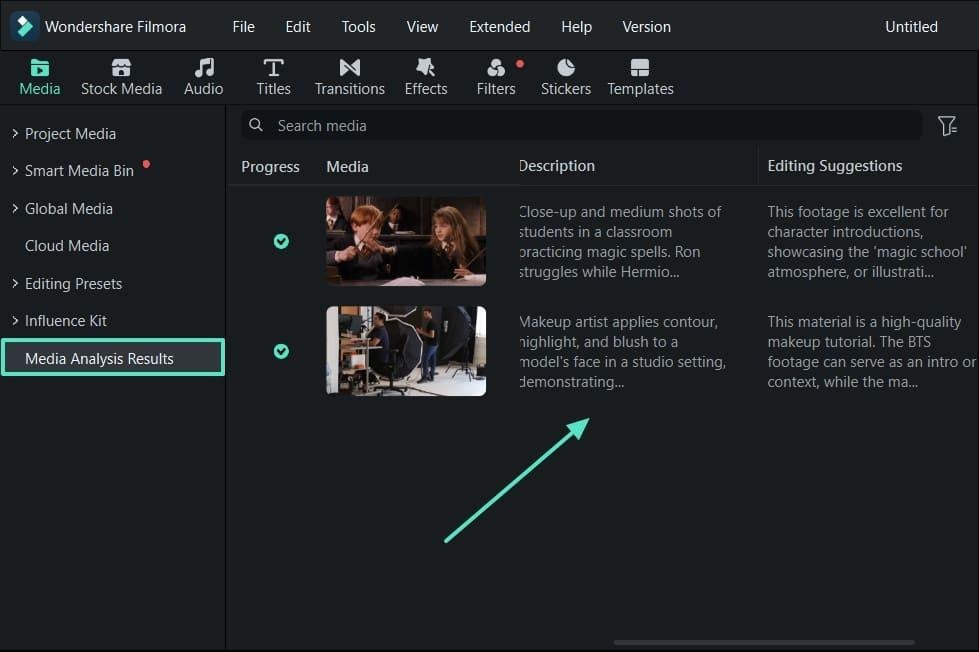
Selecting “Media Analysis Results” in the “Media” panel lists the keywords Filmora identified. Those keywords stay available while the project is edited and exported.
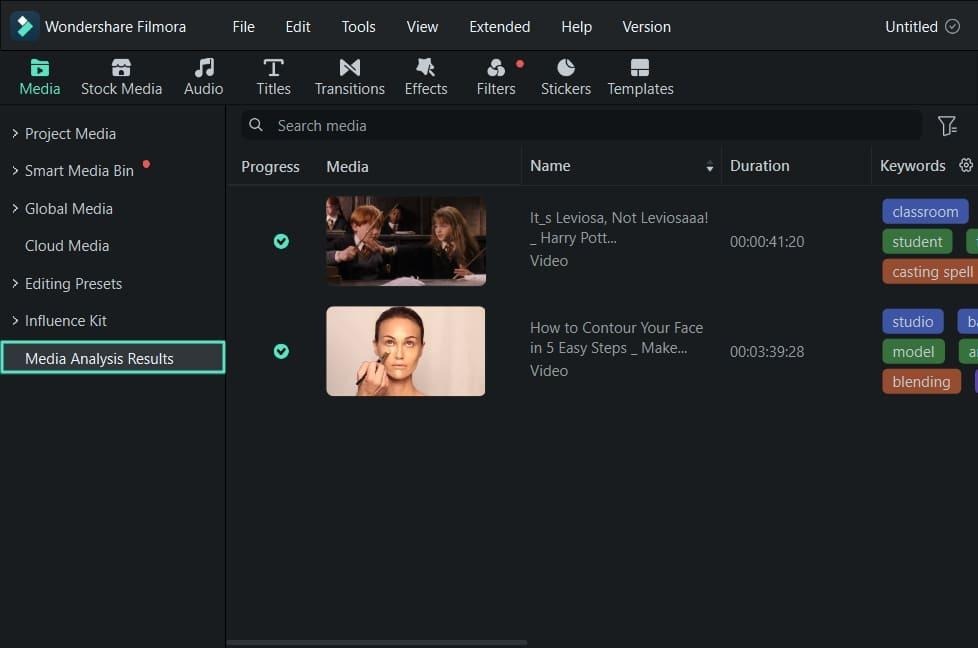
AI Media Analysis presents detected “Keywords” alongside the analyzed media inside Filmora, giving editors descriptive information they can review before continuing with the edit.
Conclusion
Video management becomes more difficult as footage grows faster than the time available to review it. AI analysis can reduce part of that workload by adding descriptive information to selected media. In Filmora, AI Media Analysis generates detected Keywords that help editors understand relevant footage faster. Decisions about quality, storytelling, and final selection still remain with the editor.
FAQs About Managing Video With AI
1. How does AI video analysis make video management easier?
AI video analysis can provide descriptive information about footage before an editor reviews every clip in detail. In Filmora, AI Media Analysis produces detected Keywords for analyzed media, helping users identify potentially relevant content and narrow down what needs closer review.
2. What is the difference between AI video tagging and AI video recognition?
AI video recognition broadly refers to identifying information within video content. AI video tagging records detected information as descriptive labels or keywords. The exact information recognized depends on the platform and the analysis technology being used.
3. How is AI Media Analysis started in Filmora?
Import the video into “Project Media” and right-click the clip in the “Media” panel. Select “AI Media Analysis,” review the required credits, and click “Generate.” Once processing finishes, open “Media Analysis Results” to review the detected Keywords.
4. Does video content analysis replace organizing footage by hand?
AI video analysis can reduce some manual review by adding descriptive information about analyzed footage. It does not replace every form of organization or editorial judgment, since editors still need to evaluate quality, performance, timing, and creative suitability themselves.