How to get Google Veo 3 for free? This question sparked heated discussions as more creators discovered Google’s powerful AI video generation model. Lots of users want to experience Veo 3 free for testing, learning, or content creation.
In this post, we explore three practical ways to try the advanced video-generating model and introduce a free alternative for users who want similar AI video generation capabilities without waiting.

Key Takeaways
- Google’s Veo 3 is an advanced AI video generator developed by DeepMind, capable of creating high-quality videos from text prompts.
- Currently, Veo 3 is not fully public or permanently free, but limited free access is available through official and experimental channels.
- Experience Google Veo 3 at no cost for 30 days with an AI Pro trial, instantly accessible online.
- Users can access it via Google’s official platforms, experimental tools, or other limited public demos.
- Some AI video generators offer free access and similar functionality for testing and content creation.
How to Try Veo 3 for Free (3 Accessible Ways)
Although Veo 3 is not fully open to the public, Google has made it accessible in several controlled ways. Here are the three accessible ways to try Veo 3 for free and start generating video today.
Method 1. Use Google One’s AI Pro Free Trial
The most legitimate way to access Veo 3 for free is through the official platform. It is available via Google One, where users can generate videos with restrictions on length or usage. Here’s how to create a video using Google One.
1. Visit the official website of Google One and follow up the on-screen instructions to sign in to your Google account.
2. Start the 30-day Google AI Pro trial to activate your account.
3. Look for the “Video” tab inside the Gemini web app and start generating videos.
Method 2. Use Google Cloud for Extended Access
If you want more than the three clips allowed in the 30-day Pro trial, you can take advantage of Google Cloud’s $300 welcome credit. This method lets you access Veo 3 through Vertex AI for more extended free use.
Here are the steps:
- Visit the official website of the Google Cloud and sign in to a new account.
- Google automatically adds $300 in credit for new users.
- Open Vertex AI, select Generative AI Studio, and choose the Video option (Google Veo 3).
- Enter your prompt, generate the video, and download it from your Cloud Storage folder.
Method 3. Follow Community-Shared Ways for Temporary Access
Some users have shared available methods to access Veo 3 through temporary trials, public showcases, or indirect testing environments, often discussed in online communities and forums.
For example, Google occasionally offers promo codes during conferences, holidays, or partner events, giving users anywhere from a week to a month of free access. These methods may involve time-limited access or special conditions.
While these official methods are exciting, they often come with significant hurdles: long waitlists, regional restrictions, or complex cloud setups. If you’re looking for a more immediate, user-friendly way to experience this professional AI video model, there is a better way forward.
Best Free Alternative to Google’s AI Video Generator
For users who want to experience Veo 3 AI video generator without access restrictions, EaseMate AI provides a practical solution. The platform allows users to try the video generation for free, making it ideal for experimentation and everyday content creation.
EaseMate AI focuses on accessibility and ease of use, offering an online, free way that does not require complex setup or technical skills. It is especially suitable for creators who want to generate short videos quickly and explore AI-driven storytelling.
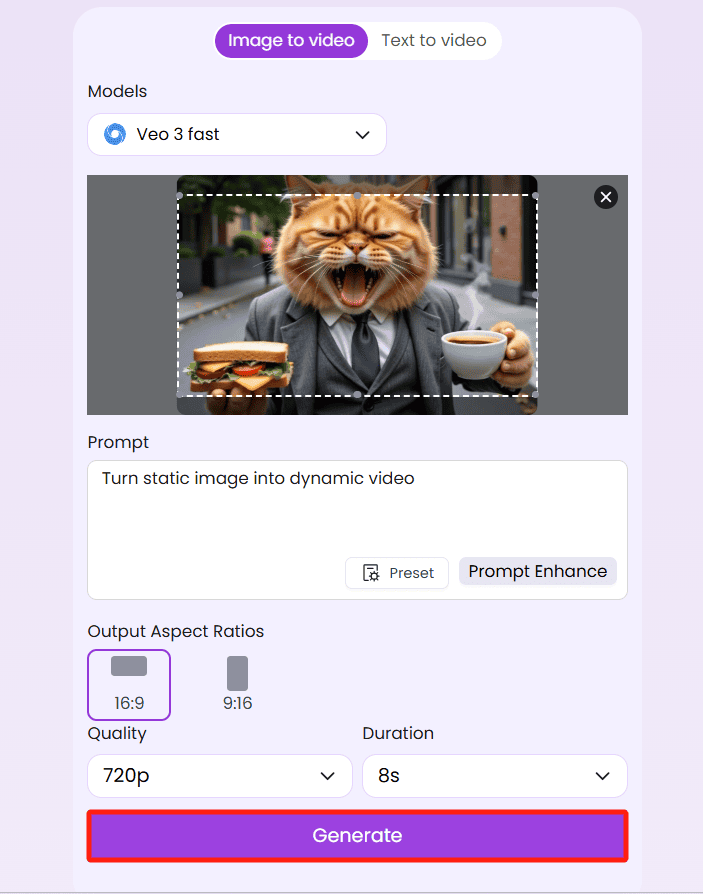
Here’s how to use EaseMate’s Veo 3 AI video generator.
- Go to the EaseMate AI’s Veo 3 video creator and select “Image to Video” or “Text to Video” based on your needs.
- Drag an image into the generator or enter your text prompt to describe your needs, including the shot layout, effects, style, visual scenes, etc.
- Select the output aspect ratios, quality, and duration of the video.
- Click the “Generate” button, and the tool will process your request and produce a complete video. Once generated, you can download the video without a watermark.
To Sum Up
While Google Veo 3 is not fully open to the public, users can still explore it through official platforms, demos, or other limited-access methods. However, if you want a more accessible option, top alternatives like EaseMate AI offer a practical way to create your unique short videos using Veo 3 in minutes.