Imagine you’re working on your laptop at a coffee shop. Your VPN is connected, your browsing feels secure, and everything is running normally. Then the Wi-Fi signal drops for a few seconds.
Your VPN disconnects, but your device may continue accessing the internet through its regular connection. Websites can suddenly see your original public IP address instead of the VPN server’s address.
That’s where a VPN Kill Switch comes in.
This feature helps prevent accidental data exposure when your VPN connection fails. Here’s how it works, why it matters, and how to enable it on your devices.
What Is a VPN Kill Switch?
A VPN Kill Switch is a security feature that automatically blocks internet traffic when your VPN connection unexpectedly drops. It prevents your device from sending data through an unprotected connection until the VPN is restored.
Normally, a VPN encrypts traffic between your device and a VPN server. Websites generally see the VPN server’s public IP address rather than your regular one.
However, an unexpected disconnection can interrupt that protection.
For example, X-VPN‘s free version includes a Kill Switch on iOS and Android, allowing users to protect their connections without purchasing a subscription.
Think of it as an emergency stop button. When the protected connection disappears, the Kill Switch temporarily closes the normal route to the internet.
How Does a VPN Kill Switch Work?
A VPN Kill Switch works by monitoring your VPN connection and controlling internet traffic when that connection becomes unavailable.
The process generally involves three stages.
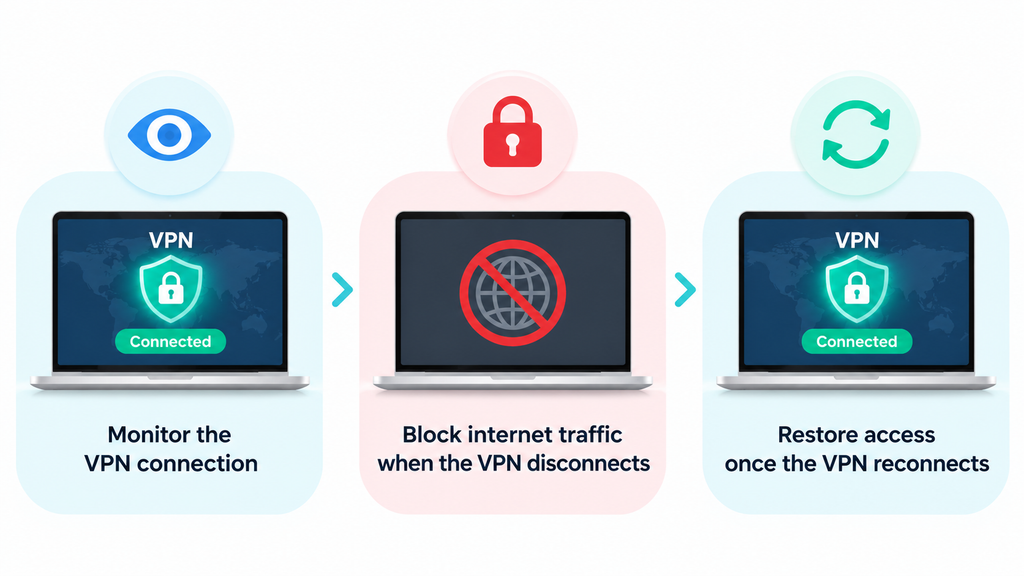
1. Monitoring the VPN Connection
While your VPN is active, the app monitors whether its connection to the VPN server is still working.
Several situations can interrupt that connection, including weak Wi-Fi signals, network changes, server problems, and device sleep settings.
When the connection fails, the Kill Switch responds according to its configuration.
2. Blocking Internet Traffic
Once a disconnection is detected, the Kill Switch blocks the network traffic covered by its protection rules.
Without this feature, your device may automatically return to its regular internet connection. Applications could then send requests using your original public IP address.
By blocking that traffic, the Kill Switch helps prevent unintended connections outside the VPN tunnel.
3. Restoring the Connection
When the VPN reconnects successfully, internet access can resume through the encrypted tunnel.
Many VPN applications handle this process automatically.
This is particularly useful when traveling. For example, someone using a free Australia VPN service might switch from hotel Wi-Fi to mobile data while connected to an Australian server. If that change interrupts the VPN, the Kill Switch helps prevent traffic from continuing through the regular connection until the VPN reconnects.
The result is simple: your device either uses the protected connection or temporarily stops the traffic that would otherwise leave it.
Why Is a VPN Kill Switch Important?
VPN connections can occasionally fail, even when your internet connection appears stable. A Kill Switch helps manage those interruptions without requiring you to constantly check the VPN app.

Protects Your IP Address
One reason people use VPNs is to keep their regular public IP address from being visible to websites and online services.
When the VPN disconnects, that address may become visible again if traffic continues through the normal connection.
A Kill Switch reduces this risk by blocking traffic during the interruption.
This is particularly useful when browsing websites, researching online, or using applications where you want to maintain a consistent VPN connection.
Adds Protection on Public Wi-Fi
Public Wi-Fi networks can be unpredictable.
You might lose your connection while moving between rooms in a hotel or walking through an airport. Your phone may also switch from Wi-Fi to cellular data automatically.
These changes can interrupt your VPN tunnel.
A Kill Switch helps keep traffic from leaving through the regular network while the VPN reconnects. It provides another layer of protection alongside HTTPS and the VPN’s encryption.
Helps Protect Remote Work Connections
Remote workers frequently access cloud platforms, shared documents, and company accounts from different locations.
A VPN Kill Switch can help maintain the intended network route when a connection becomes unstable.
For example, if your VPN disconnects during a file transfer, the Kill Switch can stop further traffic until the protected connection returns.
This makes it a useful feature for people who regularly work outside their home or office.
What Are the Different Types of VPN Kill Switches?
VPN Kill Switches generally fall into two categories: system-level and application-level.
System-Level Kill Switch
A system-level Kill Switch blocks internet traffic across the device when the VPN connection fails.
This provides broad protection because multiple applications are covered simultaneously.
It’s a practical choice for users who want their device’s internet traffic to depend on an active VPN connection.
Application-Level Kill Switch
An application-level Kill Switch focuses on selected programs rather than the entire device.
For example, you might configure protection for a particular browser or file-sharing application while allowing other programs to use the regular connection.
This provides greater flexibility when only certain applications require continuous VPN protection.
| Feature | System-Level Kill Switch | Application-Level Kill Switch |
| Coverage | Entire device | Selected applications |
| Control | Broad traffic blocking | App-specific traffic blocking |
| Best For | General privacy protection | Specific application needs |
Available options depend on the VPN provider and operating system.
How to Enable a VPN Kill Switch
Most VPN applications place their Kill Switch controls in the security or connection settings.
The exact interface varies, but the setup process is usually straightforward.
How to Enable Kill Switch in X-VPN
Step 1: Open the X-VPN application on your device.
Step 2: On mobile, go to Me > VPN Settings > Kill Switch. On desktop, open Settings > VPN Settings > Kill Switch.
Step 3: Turn on the Kill Switch option.
Step 4: Connect to a VPN server and start browsing.
Once enabled, the feature can block internet traffic if the VPN unexpectedly disconnects.
How to Enable Additional Protection on Android
Android also offers system-level VPN settings that can help prevent traffic from using an ordinary network connection.
Step 1: Open your phone’s Settings app.
Step 2: Navigate to Network & Internet > VPN, or the equivalent menu on your device.
Step 3: Select your VPN and enable Always-on VPN if supported.
Step 4: Enable Block connections without VPN to prevent traffic from using connections outside the VPN.
On iPhone, Kill Switch behavior is generally controlled through the VPN application and its supported network configurations. Check the app’s settings for the available options.
How to Test If Your VPN Kill Switch Is Working
Enabling a feature is one thing. Checking its behavior helps you understand how it protects your connection.
You can run a simple test without using sensitive accounts or important downloads.
Step 1: Connect to your VPN and enable Kill Switch.
Step 2: Open a browser and confirm that websites load normally.
Step 3: Simulate an unexpected VPN connection failure using a test method supported by your VPN application.
Step 4: Try refreshing a webpage while the VPN is disconnected.
Step 5: Check whether the webpage stops loading. Then reconnect the VPN and confirm that internet access returns.
Some Kill Switch implementations behave differently when you deliberately disconnect the VPN through the app. A connection-failure test is more useful for checking protection against unexpected interruptions.
If internet traffic continues when you expect it to be blocked, review the Kill Switch settings and your VPN provider’s instructions.
FAQs About VPN Kill Switches
Should I Always Keep My VPN Kill Switch On?
Keeping Kill Switch enabled is useful if you want to prevent internet traffic from continuing when your VPN unexpectedly disconnects.
It’s particularly helpful on public Wi-Fi, during remote work, and when switching between networks.
The trade-off is that your internet access may temporarily stop when the VPN encounters a connection problem.
Does a VPN Kill Switch Slow Down Your Internet?
A VPN Kill Switch generally has little effect on your normal internet speed because it primarily controls traffic when the VPN connection fails.
VPN speed depends more on factors such as server distance, network congestion, encryption overhead, and the VPN protocol.
If your internet frequently stops working with Kill Switch enabled, investigate the underlying VPN connection rather than assuming the feature itself is slowing down your traffic.
What Happens If My VPN Kill Switch Is Off?
Without Kill Switch protection, your device may continue using its ordinary internet connection after the VPN disconnects.
This means websites and applications could see your regular public IP address, and subsequent traffic may no longer pass through the VPN tunnel.
Your existing HTTPS connections can still provide encryption, but the VPN’s network-level protection is no longer active.
Is a VPN Kill Switch the Same as Split Tunneling?
No. These features control different aspects of VPN traffic.
A Kill Switch blocks covered traffic when the VPN connection fails.
Split Tunneling lets you choose which applications or traffic use the VPN and which use the regular network.
Some VPN services offer both features, allowing users to customize how their internet traffic is handled.
Can a VPN Kill Switch Prevent All Data Leaks?
A Kill Switch primarily addresses traffic exposure caused by VPN connection failures.
Other privacy issues, such as browser cookies, account tracking, and application permissions, require separate controls.
For broader privacy protection, combine Kill Switch with appropriate browser settings, updated software, and secure account practices.
Final Thoughts
A VPN Kill Switch is a simple feature with an important purpose: keeping internet traffic from leaving the protected connection when your VPN unexpectedly disconnects.
It’s particularly useful if you frequently use public Wi-Fi, switch between networks, or work remotely.
Enabling it usually takes only a few steps. Once configured, it can respond automatically to connection interruptions and help maintain a more consistent level of network privacy.
If your VPN includes a Kill Switch, it’s worth checking the settings and learning how the feature behaves on your device.